Deprecated: Creation of dynamic property GW_GoPricing_Shortcodes::$globals is deprecated in /var/www/html/wp-content/plugins/go_pricing/includes/shortcodes/class_shortcodes.php on line 40 EGroupware, Author at EGroupware - Page 3 of 22
COOLDays 2021

COOLDays 2021

You are currently viewing a placeholder content from YouTube. To access the actual content, click the button below. Please note that doing so will share data with third-party providers.

More Information

Day 1 – Developers Day:

The COOL Days is a conference centred around Collabora Online — the leading online office suite — and how it can be deployed to optimise security and efficiency.

Link to the Developers Days

Many interesting contributions not only for developers. We were represented with a contribution:

  • EGroupware integration update

We presented EGroupware to Collabora Online/LibreOffice developers and interested people and especially showed the possibilities to create documents from EGroupware. This, of course, mainly in the direction of Collabora Online (to stay in the browser).

Furthermore we showed current developments:

  • Inserting placeholders directly in COOL
  • Inserting contact data directly
  • Inserting data and creating PDF directly
  • Convert documents => PDF/PNG directly from the file manager

These features are currently (10.2021) in development and will be released with the next updates.

The slides for the talk can be downloaded here:

COOLdays DevelopersDay EN.pdf


Day 2 – Business Day

The COOL Days is a conference centred around Collabora Online — the leading online office suite — and how it can be deployed to optimise security and efficiency.

Link to the busines Day

Many interesting contributions. We were represented with a contribution:

  • EGroupware – a smart online office integration.

We showed how you can create documents with your information stored in EGroupware. This of course ideally with Collabora Online :slight_smile:
With many screenshots and case studies to show what is possible.

The slides of the presentation can be downloaded here.

COOLdays BusinessDay EN.pdf

EGroupware 21.1 released

EGroupware 21.1 released

Kaiserslautern, May 25, 2021 – EGroupware GmbH releases version 21.1 of the groupware solution of the same name. The new release includes single/multiple choice tests and open questions in smallPART, delivers a revised telephony integration, a new Kanban module as well as many improvements, especially for
employees working from home.


smallPART: Single/Multiple Choice Tests and Questions
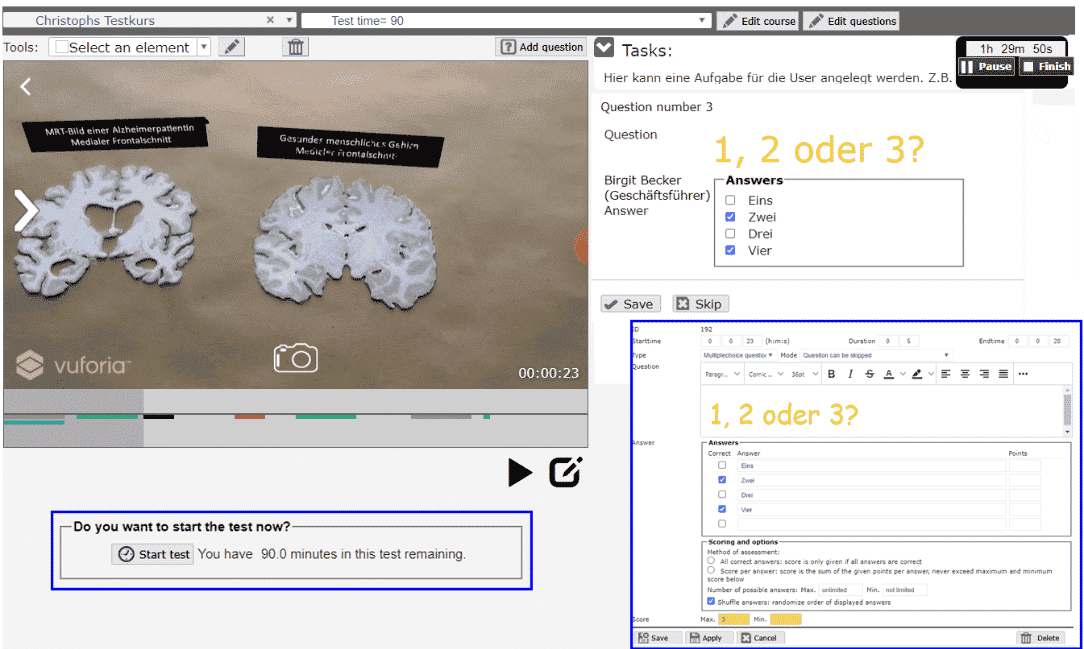
 

smallPART (selfdirected media assisted learning lectures & Process Analysis Reflection Tool) is an application for video-based learning. EGroupware GmbH develops the tool in cooperation with the Technical University of Kaiserslautern. smallPART allows time-synchronous work directly “in the video”: students and pupils can ask questions about the film or give feedback in “real time” – in secure mode or as a jointly held, public discussion.

The software for video-based learning has been part of EGroupware since version 20.1. With version 21.1, smallPART integrates single/multiple choice tests as well as open questions, and can also evaluate them automatically. The tool is thus ideal for training purposes and for use in exams – in schools, at universities, and in other learning institutions.

Thanks to LTI (Learning Tools Interoperability), smallPART interacts well with other Learning Management Systems (LMS) like Moodle, OpenOLAT and Ilias. As part of EGroupware, smallPART supports SAML authentication and single sign-on. This way, students can access smallPART via the LMS of the respective learning institution.


New Module: Kanban Board


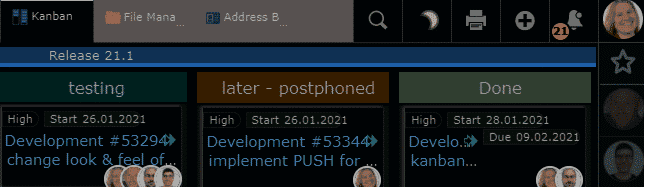
EGroupware 21.1 comes with a brand-new Kanban module that integrates seamlessly into the groupware solution. It visualizes already-existing data from some of the other groupware modules, for example, the task manager, the ticketing system, and the address book.

For now, the Kanban board offers basic functionality: defining access rights, creating columns, moving cards via drag & drop, and setting up swim lanes. Users may also define dependencies, monitor the cards and configure automatic notifications in case of certain events. Therefore users can create individual workflows and adapt the board to their own way of organizing their work.


Computer Telephony Integration (CTI)
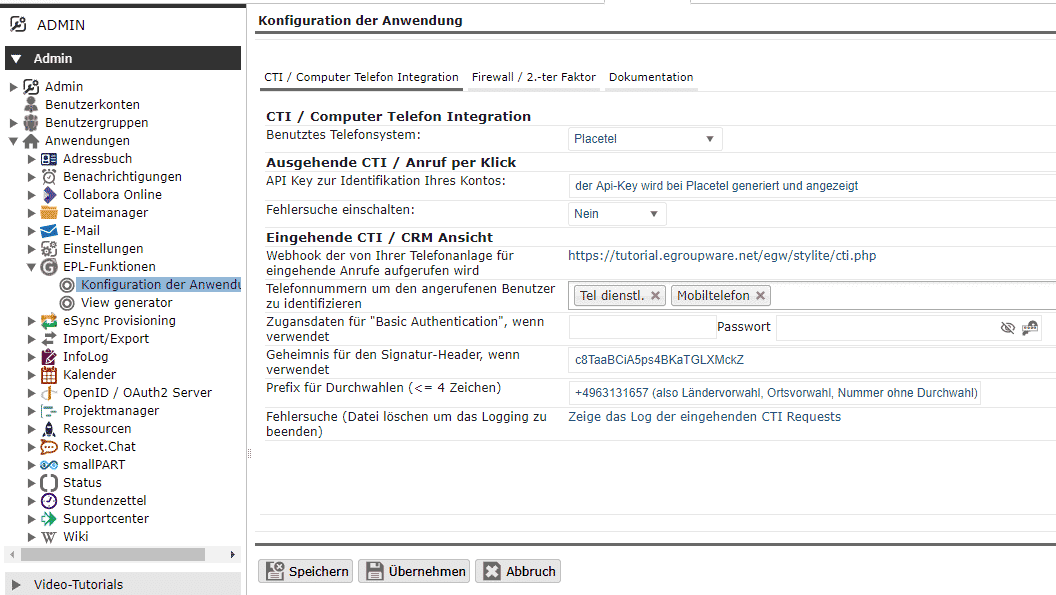
 

Also new in EGroupware 21.1 is the Computer Telephony Integration, which allows for the pairing of phones and computers – regardless of whether it’s a softphone or a desk phone. Thanks to the new feature, users can initiate and end phone calls or conferences from EGroupware, forward calls or even control them with other EGroupware applications.

For example, the calendar displays the call list, and the CRM module opens the corresponding contact. In addition, it is possible to create timesheets of the calls afterwards and thus, for example, document the support requests at the end of the day.

The new telephony integration creates closer proximity to colleagues in home office, because EGroupware now shows whether someone is currently on the phone – almost like in a shared office. The feature is reserved for subscription customers and currently works with Placetel. It accesses the system’s API and can also cooperate with other providers if their interface allows it.


Improved Push Server and Dark Mode
 

The push server introduced with EGroupware 20.1 updates the browser windows in real-time. While the previous version kept the calendar, the task manager and the timesheets in sync, the new version additionally supports the ticket system, the address book, the new Kanban module and the call list. The developers plan to connect the other groupware modules to the push service as well.

Mac users should be familiar with this feature: In dark mode, the color scheme of the interface changes to a darker look which can be pleasant for the eyes and allow users to focus better. EGroupware 21.1 has a dark mode, and users can either switch manually and click on the icon or set up the groupware to automatically select the mode according to the time of day.


Application Firewall and File Sharing


In addition to two-factor authentication, protection against brute force attacks, and the ability to define password rules or validity periods, EGroupware now offers a firewall. Admins can use it to limit access to a minimum and define, for example, login rules (time, day of week), origin (network, IP address) and group membership as well as 2FA. In combination with file server access and the Remote Desktop Protocol via EGroupware, a secure connection for home office workers without VPN is possible.

The developers have also revised the file manager’s file sharing capabilities. Internal shares can now be made available much more easily via email or link and can be permanently included in one’s own home directory (folder “shares”).


 

Further links to Egroupware 21.1

Placetel Configuration Workshop – Tipps and Ticks

Placetel Configuration Workshop – Tipps and Ticks

Webinar: Placetel Configuration

You are currently viewing a placeholder content from YouTube. To access the actual content, click the button below. Please note that doing so will share data with third-party providers.

More Information

Placetel Configuration & Setup in EGroupware

Webinar recording of the 18th of Mai 2021.

In this webinar, you will learn set up Placetel.

  • Configuration of Placetel
  • Provisioning of Phones
  • Setting up softphones
  • Setting up Telephone queues
  • Call-Routing
  • Authorisation, voicemail
  • Tipps and tricks
  • Call CRM view on incoming call
  • Qustions to the Daniel Selbach from Placetel
  • Questions to the experts from EGroupware
  • CTI integration is available in EGroupware as of version 21.1

More Information about CTI-Integration.

Download the webinar slides Telefonie Integration (CTI) in EGroupware.

If you need any help with this tools, contact us.

[dt_default_button link=”url:https%3A%2F%2Fwww.egroupware.org%2Fen%2Ftutorials|title:Webinars%20%E2%80%93%20Tutorials” size=”custom” border_radius=”3px”]More Webinars[/dt_default_button]
EGroupware 21.1 released

Release Pre-Announcement EGroupware 21.1

Kaiserslautern, May 17, 2021 – EGroupware GmbH releases version 21.1 of the groupware solution of the same name on May 25, 2021. The new release includes single/multiple choice tests and open questions in smallPART, delivers a revised telephony integration, a new Kanban module as well as many improvements, especially for employees working from home.


smallPART: Single/Multiple Choice Tests and Questions


smallPART (selfdirected media assisted learning lectures & Process Analysis Reflection Tool) is an application for video-based learning. EGroupware GmbH develops the tool in cooperation with the Technical University of Kaiserslautern. smallPART allows time-synchronous work directly “in the video”: students and pupils can ask questions about the film or give feedback in “real time” – in secure mode or as a jointly held, public discussion.

The software for video-based learning has been part of EGroupware since version 20.1. With version 21.1, smallPART integrates single/multiple choice tests as well as open questions, and can also evaluate them automatically. The tool is thus ideal for training purposes and for use in exams – in schools, at universities, and in other learning institutions.

Thanks to LTI (Learning Tools Interoperability), smallPART interacts well with other Learning Management Systems (LMS) like Moodle, OpenOLAT and Ilias. As part of EGroupware, smallPART supports SAML authentication and single sign-on. This way, students can access smallPART via the LMS of the respective learning institution.


New Module: Kanban Board


EGroupware 21.1 comes with a brand-new Kanban module that integrates seamlessly into the groupware solution. It visualizes already-existing data from some of the other groupware modules, for example, the task manager, the ticketing system, and the address book.

For now, the Kanban board offers basic functionality: defining access rights, creating columns, moving cards via drag & drop, and setting up swim lanes. Users may also define dependencies, monitor the cards and configure automatic notifications in case of certain events. Therefore users can create individual workflows and adapt the board to their own way of organizing their work.


Computer Telephony Integration (CTI)


Also new in EGroupware 21.1 is the Computer Telephony Integration, which allows for the pairing of phones and computers – regardless of whether it’s a softphone or a desk phone. Thanks to the new feature, users can initiate and end phone calls or conferences from EGroupware, forward calls or even control them with other EGroupware applications.

For example, the calendar displays the call list, and the CRM module opens the corresponding contact. In addition, it is possible to create timesheets of the calls afterwards and thus, for example, document the support requests at the end of the day.

The new telephony integration creates closer proximity to colleagues in home office, because EGroupware now shows whether someone is currently on the phone – almost like in a shared office. The feature is reserved for subscription customers and currently works with Placetel. It accesses the system’s API and can also cooperate with other providers if their interface allows it.


Improved Push Server and Dark Mode


The push server introduced with EGroupware 20.1 updates the browser windows in real-time. While the previous version kept the calendar, the task manager and the timesheets in sync, the new version additionally supports the ticket system, the address book, the new Kanban module and the call list. The developers plan to connect the other groupware modules to the push service as well.

Mac users should be familiar with this feature: In dark mode, the color scheme of the interface changes to a darker look which can be pleasant for the eyes and allow users to focus better. EGroupware 21.1 has a dark mode, and users can either switch manually and click on the icon or set up the groupware to automatically select the mode according to the time of day.


Application Firewall and File Sharing


In addition to two-factor authentication, protection against brute force attacks, and the ability to define password rules or validity periods, EGroupware now offers a firewall. Admins can use it to limit access to a minimum and define, for example, login rules (time, day of week), origin (network, IP address) and group membership as well as 2FA. In combination with file server access and the Remote Desktop Protocol via EGroupware, a secure connection for home office workers without VPN is possible.

The developers have also revised the file manager’s file sharing capabilities. Internal shares can now be made available much more easily via email or link and can be permanently included in one’s own home directory (folder “shares”).
EGroupware 21.1 and Placetel webinar recording

EGroupware 21.1 and Placetel webinar recording

EGroupware 21.1 Release

We are pleased to announce the date for the EGroupware 21.1 release: Tuesday, 25 May 2021.

As in previous years, we will successively update the instances in the EGroupware Cloud to 21.1 with corresponding advance notice. Updates in the self-installation can take place either immediately or after the release.

Placetel Integration Webinar Recording

Thank you for attending the webinar and for the positive feedback on telephone integration.  If you were unable to attend the webinar, you can now watch the webinar in the recording. We address many questions and give practical tips on integration.

Webinar recording from 06 May 2021 on Placetel integration

As already announced, we are offering another webinar on the topic of telephony integration and use of the Placetel interface in cooperation with Placetel.
You can register here for the next Placetel webinar on 18 May.

As promised in the webinar, we will be happy to support you in implementing telephone integration (CTI) and setting up/testing a Placetel telephone system.

If you would like to convince yourself of the advantages of integration and Placetel, simply send us an email to info@egroupware.org with the subject “Placetel”.

Benefits for you:

  • Test Placetel and the possibilities 30 days free of charge and without obligation or in an extended test with monthly cancellation option with 10 phone numbers and redirection of your phone numbers to Placetel.
  • Optimal integration also for home office strategies
  • Be reachable everywhere (mobile and home office) with your company number
  • Make calls in the home office via your company phone, a softphone or your mobile phone
  • Test options for any size of company
  • Step-by-step instructions in Placetel
  • Consultation on feasibility and advantages, cost-benefit analysis
    Support with the configuration of Placetel
  • Support for integration in EGroupware

Even if you are currently still unsure about the advantages for you, simply contact us and we will be happy to advise you.

EGroupware appointments and events

In 2021 there will also be some interesting events and online trade fairs where you can learn more about EGroupware in presentations and further optimise your online office. If you are interested in attending, please register with the relevant organiser.

We would be delighted to meet many of you at the events (online).

Kind regards

The EGroupware Team

This site is registered on wpml.org as a development site. Switch to a production site key to remove this banner.