Deprecated: Creation of dynamic property GW_GoPricing_Shortcodes::$globals is deprecated in /var/www/html/wp-content/plugins/go_pricing/includes/shortcodes/class_shortcodes.php on line 40 News Archives - Page 9 of 9 - EGroupware
EGroupware 14.2 RC available

EGroupware 14.2 RC available

I’m happy to announce immediate availability of a new feature complete release candidate for next EGroupware version 14.2

Installation packages are available via OpenBuildService server:eGroupWare:trunk project, see our download page:

/download

Release candidate contains following changes / fixes:

* Filemanager: Tile view for filemanager incl. new bigger Mine icons and thumbnails for OpenOffice documents
* Home: portlets (widgets on home screen) can be set as default for all users or groups by admins
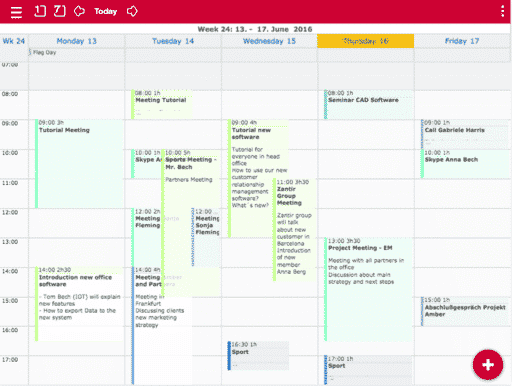
* Home: default home screen containing video tutorials, egroupware.org new and calendar week-view
* Mail: customizable toolbar in compose dialog
* Mail: fix for Horde_Imap_Client-2.26.0 requiring Horde_Mail-2.5.1 requiring Horde_Idna-1.0.1 which stalls our autoloader by calling spl_autoload_register
* Mail: fix problem sent or copied mail ending up with in folder of wrong mail account
* Univention: allow installation on backup DC too (master was working before)
* News: fixed SQL error when deleting huge number of news items
* All apps: improved German translations, other languages are lacking

Please help testing the release candidate and give us feedback via our Facebook page: https://www.facebook.com/EGroupware

Planned release date is January 22nd 2015.

We also released 14.1 maintenance packages which mainly fix a problem with current Horde_Imap_Client 2.26.0.

Happy testing
Ralf

****

Ralf Becker
Director Software Development, Stylite AG

EGroupware 14.2 Beta released

EGroupware 14.2 Beta released

I’m happy to announce the immediate availability of new 14.2 beta.

14.2 adds three – in our opinion – most wanted features:

1. Dropbox like sharing of files

EGroupware users often have the need to exchange files with people outside there own EGroupware.

With file sharing we have now a simple solution exactly for that problem.

Select one or more files or directories in Filemanager, right-click and choose Mail files as:

Attachment (old way, works reliably only for a couple of MB total file-size)
Download link: creates a copy of current version of files and mails a link allowing to download them
Readable share: mails a link allowing to download at that time current version of files
Writable share: mails a link allowing to download or update current version of files
Last option is only available in EPL subscription together with an optional expiration date or password.

The links require no further authentication, sharing your EGroupware credentials or create recipients as EGroupware users.

That new facility can also be used from Mail compose to work around attachment size limitation imposed by mail servers.

A list of shared files in Filemanager menu allows to delete a share and therefore renders a sharing link immediately unusable.

2. Home app is back in form of a customizable dashboard

Dashboard was designed as a new form to organize your work:

have a couple of key customers to need to contact daily, just drag them to dashboard to always have them available
that calendar favorite showing the week of you and your co-worker, just add it to dashboard to have it always in view
same is true for all favorites they can be added by right click on dashboard: Add >> app-name >> Favorite >> select one
select a couple of entries from any app and drag them to dashboard
of course you can also add a simple note / post-it to your dashboard
EGroupware news have been ported to eTemplate2 and are therefore available too

3. Tablet support for EGroupware

EGroupware detects now tablets and other mobile devices and switched automatically to our new “mobile” theme.

Mobile theme rearranges user interface for the small screen on your device. It also adds touch support to:

select or deselect rows via right or left swipe
tab (long click) opens context menu with all available options
menu can be hidden to maximize space available for your content (state is remembers on a per app basis)
rotating the device moves menu from left side for landscape to top for portrait orientation to make most of available space
Edit dialogs and the like open full screen as you expect it from a mobile app. They always return to list they are opened from.

Mobile theme keeps all client side data available when changing view, to minimize traffic with server, like Pixelegg or Stylite template does already. You can also select it explicit as theme for small screens.

14.2 beta is immediate available from our download page, or as package for most Linux distributions:

http://software.opensuse.org/download.html?project=server%3AeGroupWare%3Atrunk&package=egroupware-epl

Have fun trying it out and tell us what you think about it through our Facebook page:
https://www.facebook.com/EGroupware

Ralf

EGroupware 14.1 veröffentlicht

EGroupware 14.1 veröffentlicht

Team Management with Open Source

EGroupware 14.1 Release published on 10th July 2014

How efficient processes can be merged with best possible security shows EGroupware with its latest release of version 14.1, which was made public today, 10th July 2014.

With users worldwide, which number in the hundred thousands and a marked presence of more than 11 years, EGroupware is one of the most successful browser based Open Source team management applications. The developers have positioned the software as an alternative to products like Microsoft Office 365, business server solutions like Exchange or Google.

For community as well as enterprise users, the completely new developed user interface in particular as well as e.g. the new email client, the admin module and hundreds of new functions are milestones, which set apart (distinguish) the new release from its former versions.

Up to date technologies allow smooth working helped by clever functions, which leads to comfortable working by browser known formerly only to fat clients.

Software development based on jQuery, Javascript and PHP provide most modern features like auto-complete, drag & drop of files and entries, hiding of not needed controls, context menus and easier data upload with nearly unlimited data size as well as a wealth of new security functions like a restrictive content security policy and strong password encryption.

Furthermore, the synchronization with mobile devices was immensely simplified by including ActiveSync, CalDAV/Card/DAV and WebDAV into the installation packages.

According to Stylite’s statement, the international developer team has invested about 6 man years development time into the new release. ”We believe in a free internet and are very confident about the future importance of online collaboration” Ralf Becker, one of the driving forces behind EGroupware and Managing Director Stylite AG, emphasizes.

Hence, EGroupware will offer highest security standards and up to date technology for its users in the future. For example, collaborative editing of documents via web browser and encrypted real time communication are already in development.

14.1 release, new website and group administration for 1.8 users

14.1 release, new website and group administration for 1.8 users

14.1 is a huge step for EGroupware and beside all usability improvements and features, we also changed what we define as community edition (CE):

1.8 was a copy of our 2009 subscription version EPL 9.2, that ensured there were many reasons to buy our subscription, which in turn is how whole EGroupware development is financed.

But it also had a couple of drawbacks:

  • bugfixes and necessary additions like support for new iPhone versions took a lot effort to backport and were therefore either delayed or sometimes not possible at all
  • EGroupware popularity was decreasing as old community version looked quite old-fashioned and lacked features in comparison to alternatives

With 14.1 we are going to change that and community edition will be same software version as our subscription version EPL.

This does not mean all EPL features will become available in the community editions, many have, some have not. We still need to found constant development of EGroupware. Therefore we introduce an other differentiation between CE and EPL version:

The new administration app in 14.1 will no longer include managing of groups!

To elaborate a bit on that: all existing groups stay, but new installations come with only two groups, one for all users (Default) and one for administrations (Admins). Users can be added or remove from groups via user management and ACL or app run-rights can be changed via new ACL management.

This is necessary to ensure a sustainable development of EGroupware, which is in everyones interest.
We will make EPL’s group management available to our longtime community users, as they are important for us! When you submit your next usage statistic, you will receive credentials to install it. *)

Website

We just finished EGroupware’s new website for 14.1 release:

/
Please check it out, share it with friends, like it on Facebook and let us know what you think 🙂

Developing our beautiful new website took a little longer and we need to send release announcement to press in advance. Therefore final release date is move one last time to Thursday 10th July next week.

Keep on testing and translating 14.1 🙂

Ralf

****

Ralf Becker
Director Software Development, Stylite AG

*) EGroupware Community Edition transition period for group management has ended October 2014. Installation credentials are not any more issued according to wiki.egroupware.org/wiki

What is that new eTemplate2 in 14.1?

What is that new eTemplate2 in 14.1?

eTemplate is a rendering engine used in previous EGroupware versions to generate user interface for most apps. It takes content from an app plus a template and renders it on the server as HTML. When user submits that HTML form in its browser eTemplate engine receives it again on server, validates the input and passes it back to the application.

All this was done on the server and reaction to user input mostly required a server round trip. There were no API to manipulate an already rendered template on client aka browser side.

All that changes with eTemplate2 in 14.1:
apps use a largely identical API on server-side, they are easy to port to 14.1
that eT2 API sends content as JSON (JavaScript Object Notation) incl. an url to a XML template description to browser
eTemplate2 engine in browser loads template and renders user interface (UI)
client-side part of app interacts directly with eTemplate: eg. show or hides a UI element / widget or changes its appearance
eTemplate and app use client-side EGroupware API eg. to query a user preference, an account detail or a link title
if a new tabbed template is used, e.g. 14.1 Pixelegg template, API persists on client and caches data requested from server

You might ask: All that’s very theoretical, what do I have from it? I will describe a couple of new widgets, to illustrate big usability improvements in 14.1 and new possibilities available:

Context menus and toolbars
Lists, trees in facts all UI elements can now have a context menu showing what actions are available on a row or a tree element. This replaces sometimes huge number of icons we had in lists before. Some apps eg. new mail use now toolbars to show available actions. User can reorder these icons to his own needs and even hide less used ones in a “more…” drop-down.

Drag and drop inside EGroupware and to and from your desktop
Files can be uploaded by dragging them from your desktop onto a popup editing an entry eg. an InfoLog or a mail composed. You can also drag a file on a row in a list.

File can be dragged out eg. from Filemanager app onto your desktop, if your browser supports that, currently only Chrome does.

File uploads
are no longer limited by PHPs memory-limit, thanks to our support of html5 file API.

Filemanager app is now a first class citizen and files stored in it are available everywhere for attaching or linking, where previous EGroupware versions required one to download and re-upload such a file.

EGroupware entries can also linked by dragging them on an other entry.

Endless scrolling in lists
Before EGroupware 14.1 all web applications had to implement something called pagination for their lists. The app only showed a limited number of rows in a list and arrows to load next or previous set of rows. Users always had to choose between a quick and short or a long and slower list.

eTemplate2 lists now show a scrollbar for the whole list and load further entries on demand while you scroll up or down.

eTemplate2 lists now also allow to resize their columns and have keyboard navigation. They allow to select multiple rows and run actions on them.

Loading of UI parts on demand
eTemplate2 can postpone rendering and even loading of non-visible UI elements. Eg. a history tab does not load its content before a user changes to it. Then it employs above described endless scrolling list to show all history of an entry, but only loads a couple of lines from the server.

Framed templates sets like new Pixelegg one also only load the active app, postponing loading all other open ones until user chooses to look at them.

This is only an excerpt of new UI elements and usability improvements made available by eTemplate2 and its focus on rendering and interacting with the user on client- aka. browser side.

With 14.1 we mostly focused on developing eTemplate2 engine and porting apps to it with features they already had. Next versions will see even higher use of this new possibilities and complete rewrites of apps like we did it in 14.1 with mail and partially with admin. I will blog about them in my next articles.

Ralf Becker

Director Software Development

This site is registered on wpml.org as a development site. Switch to a production site key to remove this banner.