Deprecated: Creation of dynamic property GW_GoPricing_Shortcodes::$globals is deprecated in /var/www/html/wp-content/plugins/go_pricing/includes/shortcodes/class_shortcodes.php on line 40 News Archives - Page 4 of 12 - EGroupware
CTI telephone system connection with AGFEO

CTI telephone system connection with AGFEO

The aim of a CTI integration is to increase productivity and enable staff to work easily and comfortably. The dialled number is called with one click without having to enter the number via the keyboard.

Advantages of CTI integration.

The connection of the groupware solution EGroupware and the telephone system makes your employees’ work much easier. Time-consuming searching and typing of telephone numbers is a thing of the past. With just one click, you can set up the telephone call directly from EGroupware.

In order to be able to use the new functions, all customer data and the telephone numbers must be stored in EGroupware.

So how does the connection between your telephone system and the EGroupware software work?

AGFEO telephones can best be connected directly via the CTI integration.

For more information on setting up CTI integration, see the following article in the AGFEO blog.

About AGFEO.

Since its foundation in 1947, AGFEO has been developing telecommunications solutions.
With analogue, ISDN and VoIP products and solutions, technical know-how and a comprehensive range of services and products, AGFEO meets the needs of its customers.

The new AGFEO Dashboard is already the 5th generation of CTI/UC software from AGFEO. Based on this long-standing know-how, the new version meets all current customer requirements and continues the tradition in a modern way.


COOLDays 2021

COOLDays 2021

You are currently viewing a placeholder content from YouTube. To access the actual content, click the button below. Please note that doing so will share data with third-party providers.

More Information

Day 1 – Developers Day:

The COOL Days is a conference centred around Collabora Online — the leading online office suite — and how it can be deployed to optimise security and efficiency.

Link to the Developers Days

Many interesting contributions not only for developers. We were represented with a contribution:

  • EGroupware integration update

We presented EGroupware to Collabora Online/LibreOffice developers and interested people and especially showed the possibilities to create documents from EGroupware. This, of course, mainly in the direction of Collabora Online (to stay in the browser).

Furthermore we showed current developments:

  • Inserting placeholders directly in COOL
  • Inserting contact data directly
  • Inserting data and creating PDF directly
  • Convert documents => PDF/PNG directly from the file manager

These features are currently (10.2021) in development and will be released with the next updates.

The slides for the talk can be downloaded here:

COOLdays DevelopersDay EN.pdf


Day 2 – Business Day

The COOL Days is a conference centred around Collabora Online — the leading online office suite — and how it can be deployed to optimise security and efficiency.

Link to the busines Day

Many interesting contributions. We were represented with a contribution:

  • EGroupware – a smart online office integration.

We showed how you can create documents with your information stored in EGroupware. This of course ideally with Collabora Online :slight_smile:
With many screenshots and case studies to show what is possible.

The slides of the presentation can be downloaded here.

COOLdays BusinessDay EN.pdf

EGroupware 21.1 released

EGroupware 21.1 released

Kaiserslautern, May 25, 2021 – EGroupware GmbH releases version 21.1 of the groupware solution of the same name. The new release includes single/multiple choice tests and open questions in smallPART, delivers a revised telephony integration, a new Kanban module as well as many improvements, especially for
employees working from home.


smallPART: Single/Multiple Choice Tests and Questions
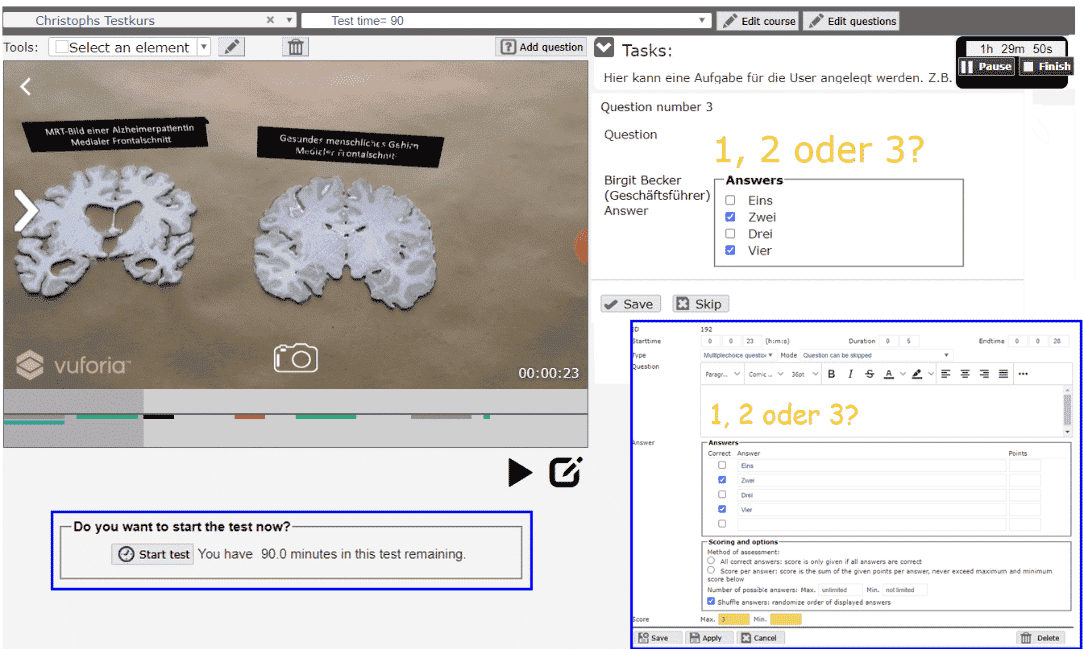
 

smallPART (selfdirected media assisted learning lectures & Process Analysis Reflection Tool) is an application for video-based learning. EGroupware GmbH develops the tool in cooperation with the Technical University of Kaiserslautern. smallPART allows time-synchronous work directly “in the video”: students and pupils can ask questions about the film or give feedback in “real time” – in secure mode or as a jointly held, public discussion.

The software for video-based learning has been part of EGroupware since version 20.1. With version 21.1, smallPART integrates single/multiple choice tests as well as open questions, and can also evaluate them automatically. The tool is thus ideal for training purposes and for use in exams – in schools, at universities, and in other learning institutions.

Thanks to LTI (Learning Tools Interoperability), smallPART interacts well with other Learning Management Systems (LMS) like Moodle, OpenOLAT and Ilias. As part of EGroupware, smallPART supports SAML authentication and single sign-on. This way, students can access smallPART via the LMS of the respective learning institution.


New Module: Kanban Board


EGroupware 21.1 comes with a brand-new Kanban module that integrates seamlessly into the groupware solution. It visualizes already-existing data from some of the other groupware modules, for example, the task manager, the ticketing system, and the address book.

For now, the Kanban board offers basic functionality: defining access rights, creating columns, moving cards via drag & drop, and setting up swim lanes. Users may also define dependencies, monitor the cards and configure automatic notifications in case of certain events. Therefore users can create individual workflows and adapt the board to their own way of organizing their work.


Computer Telephony Integration (CTI)
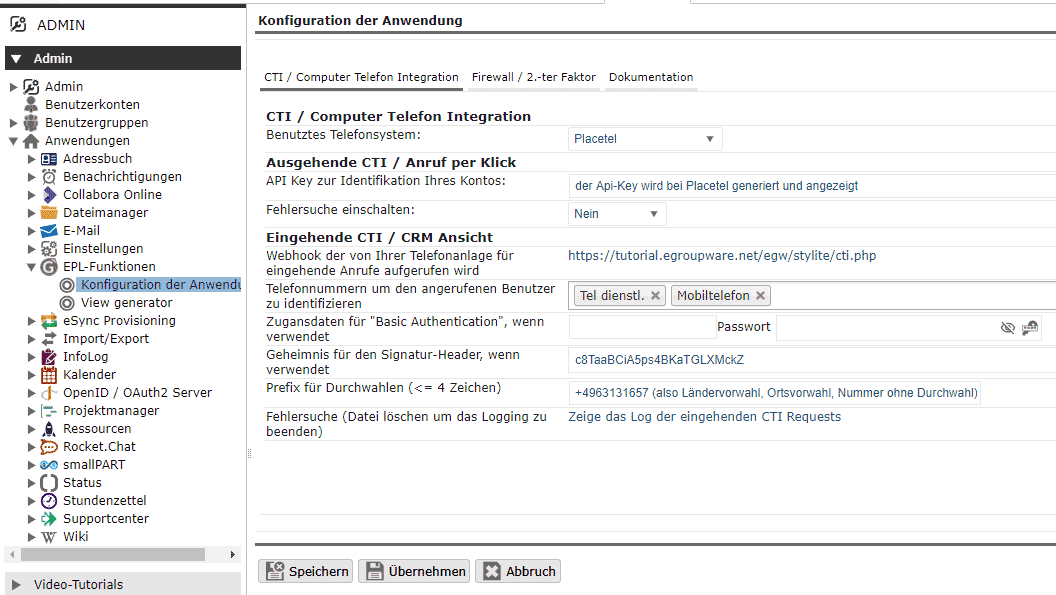
 

Also new in EGroupware 21.1 is the Computer Telephony Integration, which allows for the pairing of phones and computers – regardless of whether it’s a softphone or a desk phone. Thanks to the new feature, users can initiate and end phone calls or conferences from EGroupware, forward calls or even control them with other EGroupware applications.

For example, the calendar displays the call list, and the CRM module opens the corresponding contact. In addition, it is possible to create timesheets of the calls afterwards and thus, for example, document the support requests at the end of the day.

The new telephony integration creates closer proximity to colleagues in home office, because EGroupware now shows whether someone is currently on the phone – almost like in a shared office. The feature is reserved for subscription customers and currently works with Placetel. It accesses the system’s API and can also cooperate with other providers if their interface allows it.


Improved Push Server and Dark Mode
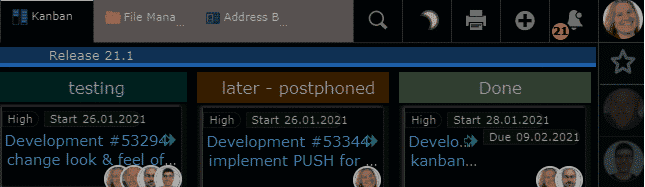
 

The push server introduced with EGroupware 20.1 updates the browser windows in real-time. While the previous version kept the calendar, the task manager and the timesheets in sync, the new version additionally supports the ticket system, the address book, the new Kanban module and the call list. The developers plan to connect the other groupware modules to the push service as well.

Mac users should be familiar with this feature: In dark mode, the color scheme of the interface changes to a darker look which can be pleasant for the eyes and allow users to focus better. EGroupware 21.1 has a dark mode, and users can either switch manually and click on the icon or set up the groupware to automatically select the mode according to the time of day.


Application Firewall and File Sharing


In addition to two-factor authentication, protection against brute force attacks, and the ability to define password rules or validity periods, EGroupware now offers a firewall. Admins can use it to limit access to a minimum and define, for example, login rules (time, day of week), origin (network, IP address) and group membership as well as 2FA. In combination with file server access and the Remote Desktop Protocol via EGroupware, a secure connection for home office workers without VPN is possible.

The developers have also revised the file manager’s file sharing capabilities. Internal shares can now be made available much more easily via email or link and can be permanently included in one’s own home directory (folder “shares”).


Further links to Egroupware 21.1

EGroupware 21.1 released

Sortie d’EGroupware 21.1

Kaiserslautern, 25 mai 2021 – EGroupware GmbH publie la version 21.1 de la solution de groupware du même nom. La nouvelle version inclut des tests à choix unique/multiple et des questions ouvertes dans smallPART, offre une intégration révisée de la téléphonie, un nouveau module Kanban ainsi que de nombreuses améliorations, notamment pour
les employés travaillant à domicile..


smallPART : Tests et questions à choix unique/multiple


smallPART (selfdirected media assisted learning lectures & Process Analysis Reflection Tool) est une application pour l’apprentissage par vidéo. EGroupware GmbH développe cet outil en coopération avec l’Université technique de Kaiserslautern. smallPART permet un travail synchronisé directement “dans la vidéo” : les étudiants et les élèves peuvent poser des questions sur le film ou donner leur avis en “temps réel” – en mode sécurisé ou sous la forme d’une discussion publique commune.

Le logiciel d’apprentissage par la vidéo fait partie d’EGroupware depuis la version 20.1. Avec la version 21.1, smallPART intègre des tests à choix unique/multiple ainsi que des questions ouvertes, et peut également les évaluer automatiquement. Cet outil est donc idéal pour la formation et les examens, dans les écoles, les universités et les autres établissements d’enseignement.

Grâce à LTI (Learning Tools Interoperability), smallPART interagit bien avec d’autres systèmes de gestion de l’apprentissage (LMS) comme Moodle, OpenOLAT et Ilias. Dans le cadre d’EGroupware, smallPART prend en charge l’authentification SAML et l’authentification unique. Ainsi, les étudiants peuvent accéder à smallPART via le LMS de leur établissement d’enseignement respectif.


Nouveau module : Tableau Kanban


EGroupware 21.1 est livré avec un tout nouveau module Kanban qui s’intègre parfaitement à la solution de travail collaboratif. Il visualise les données déjà existantes de certains des autres modules du collecticiel, par exemple, le gestionnaire de tâches, le système de billetterie et le carnet d’adresses.

Pour l’instant, le tableau Kanban offre des fonctionnalités de base : définition des droits d’accès, création de colonnes, déplacement des cartes par glisser-déposer et mise en place de couloirs de circulation. Les utilisateurs peuvent également définir des dépendances, surveiller les cartes et configurer des notifications automatiques en cas de certains événements. Les utilisateurs peuvent donc créer des flux de travail individuels et adapter le tableau à leur propre façon d’organiser leur travail.


Intégration téléphonie-informatique (CTI)


Autre nouveauté d’EGroupware 21.1 : l’intégration de la téléphonie par ordinateur, qui permet de coupler les téléphones et les ordinateurs, qu’il s’agisse d’un softphone ou d’un téléphone de bureau. Grâce à cette nouvelle fonctionnalité, les utilisateurs peuvent lancer et terminer des appels téléphoniques ou des conférences à partir d’EGroupware, transférer des appels ou même les contrôler avec d’autres applications EGroupware.

Par exemple, le calendrier affiche la liste des appels, et le module CRM ouvre le contact correspondant. En outre, il est possible de créer des feuilles de temps des appels après coup et ainsi, par exemple, de documenter les demandes d’assistance à la fin de la journée.

La nouvelle intégration de la téléphonie crée une plus grande proximité avec les collègues dans le bureau à domicile, car EGroupware indique maintenant si quelqu’un est actuellement au téléphone – presque comme dans un bureau partagé. Cette fonctionnalité est réservée aux clients abonnés et fonctionne actuellement avec Placetel. Il accède à l’API du système et peut également coopérer avec d’autres fournisseurs si leur interface le permet.


Amélioration du serveur Push et du Dark Mode


Le serveur push introduit avec EGroupware 20.1 met à jour les fenêtres du navigateur en temps réel. Alors que la version précédente permettait de synchroniser le calendrier, le gestionnaire de tâches et les feuilles de temps, la nouvelle version prend également en charge le système de tickets, le carnet d’adresses, le nouveau module Kanban et la liste des appels. Les développeurs prévoient de connecter les autres modules de groupware au service de poussée également.

Les utilisateurs de Mac devraient être familiarisés avec cette fonction : En mode sombre, la palette de couleurs de l’interface passe à un aspect plus sombre qui peut être agréable pour les yeux et permettre aux utilisateurs de mieux se concentrer. EGroupware 21.1 dispose d’un mode sombre, et les utilisateurs peuvent soit changer manuellement et cliquer sur l’icône, soit configurer le collecticiel pour qu’il sélectionne automatiquement le mode en fonction de l’heure de la journée.


Pare-feu applicatif et partage de fichiers


Outre l’authentification à deux facteurs, la protection contre les attaques par force brute et la possibilité de définir des règles de mot de passe ou des périodes de validité, EGroupware propose désormais un pare-feu. Les administrateurs peuvent l’utiliser pour limiter l’accès à un minimum et définir, par exemple, des règles de connexion (heure, jour de la semaine), l’origine (réseau, adresse IP) et l’appartenance à un groupe ainsi que le 2FA. En combinaison avec l’accès au serveur de fichiers et le protocole de bureau à distance via EGroupware, une connexion sécurisée pour les travailleurs du bureau à domicile sans VPN est possible.

Les développeurs ont également revu les capacités de partage de fichiers du gestionnaire de fichiers. Les partages internes peuvent maintenant être rendus disponibles beaucoup plus facilement par email ou par lien et peuvent être inclus de façon permanente dans le répertoire personnel (dossier “shares”).

EGroupware 21.1 released

EGroupware 21.1 freigegeben

Kaiserslautern, 25. Mai 2021 – Die EGroupware GmbH veröffentlicht die Version 21.1 der gleichnamigen Groupware-Lösung. Das neue Release beinhaltet Single/Multiple-Choice-Tests und offene Fragen in smallPART, liefert eine überarbeitete Telefonie-Integration, ein neues Kanban-Modul sowie viele Verbesserungen, insbesondere für
Mitarbeiter, die von zu Hause aus arbeiten.


smallPART: Single/Multiple-Choice-Tests und Fragen


smallPART (selfdirected media assisted learning lectures & Process Analysis Reflection Tool) ist eine Anwendung zum videogestützten Lernen. Die EGroupware GmbH entwickelt das Tool in Kooperation mit der TU Kaiserslautern. smallPART erlaubt das zeitsynchrone Arbeiten direkt „im Video“: Studierende und Schüler*innen können in „Echtzeit“ Fragen zum Film stellen oder Feedback geben – im abgesicherten Modus oder als gemeinsam geführte, öffentliche Diskussion.

Die Software zum videogestützten Lernen ist seit Version 20.1 Bestandteil von EGroupware. Mit Version 21.1 integriert smallPART Single/Multiple-Choice-Tests sowie offene Fragen und kann diese auch automatisch auswerten. Das Tool eignet sich damit ideal zu Schulungszwecken und für den Einsatz in Prüfungen – im Schulunterricht, an den Hochschulen und in anderen Einrichtungen.

smallPART interagiert dank LTI (Learning Tools Interoperability) gut mit anderen Lern-ManagementSystemen wie Moodle, OpenOLAT und Ilias Als Teil von EGroupware beherrscht smallPART die SAML-Authentifizierung und Single Sign-on. Auf diese Weise erhalten Studierende und Schüler*innen Zugriff auf smallPART über das LMS der Lehranstalt oder Hochschule.


Neues Modul: Kanban-Board


Die Entwickler haben EGroupware 21.1 um ein Kanban-Modul erweitert, das sich nahtlos in die Groupware-Lösung integriert. Es visualisiert bereits vorhandene Daten aus der Aufgabenverwaltung, dem Ticketsystem und dem Adressbuch.

Das Kanban-Modul unterstützt das Definieren von Zugriffsrechten, das Einrichten von Spalten, Verschieben der Karten per Drag & Drop sowie Schwimmbahnen. Auch das Definieren von Abhängigkeiten und das Überwachen der Karten mit Benachrichtigungen bei bestimmten Ereignissen sind möglich.. So gestalten Benutzer*innen ganz individuelle Workflows und passen das Board an die eigene Arbeitsweise an.


Telefonie-Integration (CTI)


Neu in EGroupware 21.1 ist auch die Computer-Telefonie-Integration, die das Koppeln von Telefonen und Computern ermöglicht – ganz egal, ob es sich um ein Softphone oder ein Tischtelefon handelt. Dank des neuen Features können Benutzer*innen Telefongespräche oder – konferenzen aus EGroupware heraus initiieren und beenden, Anrufe weiterleiten oder sogar mit anderen EGroupware-Anwendungen steuern.

So zeigt der Kalender beispielsweise auf Wunsch die Anrufliste an, und das CRM-Modul öffnet den dazugehörigen Kontakt. Zudem ist es möglich, im Nachhinein Stundenzettel auf die Gespräche zu buchen und damit beispielsweise die Supportanfragen am Ende des Tages zu dokumentieren.

Der bereits mit EGroupware 20.1 eingeführte Push-Server aktualisiert die Ansicht im Browserfenster in Echtzeit. Beim Vorgänger hielt der Dienst den Kalender, die Aufgabenverwaltung und den Stundenzettel synchron. In 20.1 unterstützt er zusätzlich das Ticketsystem, das Adressbuch, das neue Kanban-Modul und die Anrufliste. Die Entwickler planen, auch die übrigen Groupware-Module an den Push-Server anzubinden.


Verbesserter Push-Server und Dark Mode


Der bereits mit EGroupware 20.1 eingeführte Push-Server aktualisiert die Ansicht im Browserfenster in Echtzeit. Beim Vorgänger hielt der Dienst den Kalender, die Aufgabenverwaltung und den Stundenzettel synchron. In 20.1 unterstützt er zusätzlich das Ticketsystem, das Adressbuch, das neue Kanban-Modul und die Anrufliste. Die Entwickler planen, auch die übrigen Groupware-Module an den Push-Server anzubinden.

Mac-User kennen das Feature bereits: Im dunklen Modus wechselt das Farbschema der Oberfläche – viele empfinden das als angenehm für die Augen und die Konzentration. Auch EGroupware 21.1 enthält jetzt einen Dark Mode. Anwender*innen schalten entweder manuell per Mausklick um oder richten die Groupware so ein, dass sie den Modus automatisch passend zur Tageszeit wählt.


Application-Firewall und File-Sharing-Dienst


Zusätzlich zur Zwei-Faktor-Authentifizierung, einem Schutz gegen Brute-Force-Angriffe und der Möglichkeit, Passwort-Regeln bzw. eine -Gültigkeitsdauer zu definieren, bietet EGroupware jetzt eine Firewall. Admins können damit den Zugriff auf ein Minimum begrenzen und z. B. Login-Regeln (Uhrzeit, Wochentag), Herkunft (Netzwerk, IP-Adresse) und Gruppenzugehörigkeit und 2FA definieren. In Verbindung mit dem File-Server-Zugriff und dem Remote Desktop Protocol über EGroupware ist so eine sichere Verbindung für Homeoffice-Arbeiter*innen ohne VPN möglich.

Die Entwickler haben außerdem die File-Sharing-Fähigkeiten des Dateimanagers überarbeitet. Interne Freigaben lassen sich nun viel leichter per E-Mail oder Link teilen und dauerhaft im eigenen Home-Verzeichnis (Ordner „shares“) einbinden.

EGroupware 21.1 released

Release Pre-Announcement EGroupware 21.1

Kaiserslautern, May 17, 2021 – EGroupware GmbH releases version 21.1 of the groupware solution of the same name on May 25, 2021. The new release includes single/multiple choice tests and open questions in smallPART, delivers a revised telephony integration, a new Kanban module as well as many improvements, especially for employees working from home.


smallPART: Single/Multiple Choice Tests and Questions


smallPART (selfdirected media assisted learning lectures & Process Analysis Reflection Tool) is an application for video-based learning. EGroupware GmbH develops the tool in cooperation with the Technical University of Kaiserslautern. smallPART allows time-synchronous work directly “in the video”: students and pupils can ask questions about the film or give feedback in “real time” – in secure mode or as a jointly held, public discussion.

The software for video-based learning has been part of EGroupware since version 20.1. With version 21.1, smallPART integrates single/multiple choice tests as well as open questions, and can also evaluate them automatically. The tool is thus ideal for training purposes and for use in exams – in schools, at universities, and in other learning institutions.

Thanks to LTI (Learning Tools Interoperability), smallPART interacts well with other Learning Management Systems (LMS) like Moodle, OpenOLAT and Ilias. As part of EGroupware, smallPART supports SAML authentication and single sign-on. This way, students can access smallPART via the LMS of the respective learning institution.


New Module: Kanban Board


EGroupware 21.1 comes with a brand-new Kanban module that integrates seamlessly into the groupware solution. It visualizes already-existing data from some of the other groupware modules, for example, the task manager, the ticketing system, and the address book.

For now, the Kanban board offers basic functionality: defining access rights, creating columns, moving cards via drag & drop, and setting up swim lanes. Users may also define dependencies, monitor the cards and configure automatic notifications in case of certain events. Therefore users can create individual workflows and adapt the board to their own way of organizing their work.


Computer Telephony Integration (CTI)


Also new in EGroupware 21.1 is the Computer Telephony Integration, which allows for the pairing of phones and computers – regardless of whether it’s a softphone or a desk phone. Thanks to the new feature, users can initiate and end phone calls or conferences from EGroupware, forward calls or even control them with other EGroupware applications.

For example, the calendar displays the call list, and the CRM module opens the corresponding contact. In addition, it is possible to create timesheets of the calls afterwards and thus, for example, document the support requests at the end of the day.

The new telephony integration creates closer proximity to colleagues in home office, because EGroupware now shows whether someone is currently on the phone – almost like in a shared office. The feature is reserved for subscription customers and currently works with Placetel. It accesses the system’s API and can also cooperate with other providers if their interface allows it.


Improved Push Server and Dark Mode


The push server introduced with EGroupware 20.1 updates the browser windows in real-time. While the previous version kept the calendar, the task manager and the timesheets in sync, the new version additionally supports the ticket system, the address book, the new Kanban module and the call list. The developers plan to connect the other groupware modules to the push service as well.

Mac users should be familiar with this feature: In dark mode, the color scheme of the interface changes to a darker look which can be pleasant for the eyes and allow users to focus better. EGroupware 21.1 has a dark mode, and users can either switch manually and click on the icon or set up the groupware to automatically select the mode according to the time of day.


Application Firewall and File Sharing


In addition to two-factor authentication, protection against brute force attacks, and the ability to define password rules or validity periods, EGroupware now offers a firewall. Admins can use it to limit access to a minimum and define, for example, login rules (time, day of week), origin (network, IP address) and group membership as well as 2FA. In combination with file server access and the Remote Desktop Protocol via EGroupware, a secure connection for home office workers without VPN is possible.

The developers have also revised the file manager’s file sharing capabilities. Internal shares can now be made available much more easily via email or link and can be permanently included in one’s own home directory (folder “shares”).

This site is registered on wpml.org as a development site. Switch to a production site key to remove this banner.