Deprecated: Creation of dynamic property GW_GoPricing_Shortcodes::$globals is deprecated in /var/www/html/wp-content/plugins/go_pricing/includes/shortcodes/class_shortcodes.php on line 40 EGroupware, Author at EGroupware - Page 15 of 35
Nouvelles fonctionnalités et applications dans EGroupware 21.1

Nouvelles fonctionnalités et applications dans EGroupware 21.1

Nouvelles fonctionnalités et applications dans EGroupware 21.1

Cher utilisateur d’EGroupware,

Comme vous l’avez probablement remarqué, EGroupware a (depuis le début 2021) un nouveau site web et un nouveau logo, que nous présentons ici pour la première fois. Jetez un coup d’œil à notre
Site web EGroupware
il y a beaucoup à découvrir. De plus, le développement d’EGroupware 21.1 est en cours et une première version de pré-version sera bientôt disponible. EGroupware 21.1 est déjà disponible dans le nuage EGroupware – par exemple utilisé dans notre centre de support.
Si vous souhaitez tester EGroupware 21.1, il vous suffit de nous le faire savoir.


Principales caractéristiques d’EGroupware 21.1


  • Conseil duKanban Board pour les tâches, les projets, les billets ou comme canal de vente pour le département des ventes
  • apprentissage vidéo ensmallPART avec choix unique ou multiple ou questions ouvertes pour les tests et examens
  • Amélioration du partage dans le Filemanager pour le partage au sein d’EGroupware
  • Thème en mode sombre avec changement facile
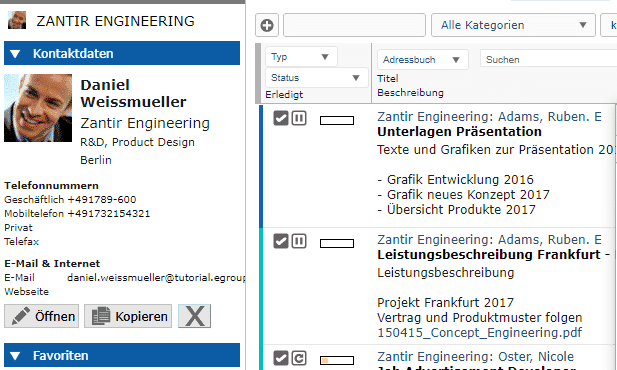
  • Intégration de la téléphonie améliorée avec l’identification de l’appelant et l’ouverture de
    Vue du CRM
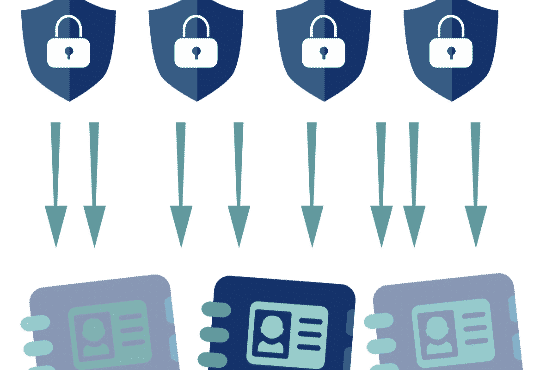
  • Politique de pare-feu EGroupware pour des règles d’accès plus complexes Externe/interne


Intégration du bureau à domicile d’EGroupware


Avec EGroupware, vous pouvez travailler dans votre bureau à domicile ou sur des sites distribués. Accédez ensemble aux tâches, rendez-vous, dossiers, adresses et projets.

  • Travaillez ensemble sur vos documents avec Collabora Online, qui sont stockés de manière centralisée dans le gestionnaire de fichiers EGroupware.
  • Lechat et les vidéoconférences via Jitsi ou BigBlueButton sont également possibles, conformément à la GDPR. Si vous ne souhaitez pas exploiter votre propre serveur vidéo, nous vous recommandons les fournisseurs allemands suivants : KiwiTalk.de et bbbserver.de
  • Avec le module Guacamole, vous obtenez un véritable bureau à domicile grâce à un accès sécurisé par navigateur web à votre PC dans l’entreprise.


Les serveurs de messagerie EGroupware et SpamTitan


Les paquets du serveur de messagerie EGroupware (pigeonnier basé sur PUSH) : (pigeonnier basé avec PUSH) :
Recommandé pour l’auto-installation avec les utilisateurs en SQL
Avantage : administration facile des comptes de messagerie à partir d’EGroupware, y compris l’alias, la redirection, l’autorisation de comptes ou de dossiers de messagerie pour d’autres utilisateurs, les règles du filtre Sieve et l’avis d’absence (peut également être défini par un administrateur pour d’autres personnes, par exemple en cas de maladie).
Filtrage optionnel des spamset des virus via SpamTitan, y compris une connexion API dans EGroupware pour le marquage des SPAM/Ham (mode apprentissage) ou des listes noires/listes blanches.

Application du kanban

pour des tâches, des projets, des billets ou comme entonnoir de vente

EPL uniquement

Avec la nouvelle application Kanban, vous gérez les processus de manière intelligente et flexible.
Il vous suffit de définir un tableau Kanban avec les applications et les groupes d’utilisateurs que vous souhaitez utiliser.
Pour plus d’automatisme, vous définissez la manière dont les nouvelles entrées sont ajoutées ou les actions qui doivent avoir lieu lorsqu’elles sont déplacées.

Par exemple, si vous déplacez une tâche dans la colonne “terminé”, elle est fermée et retirée du tableau. Deux personnes sont responsables d’une étape du processus ? Vous le définissez sur le tableau et l’affectation se fait automatiquement.

[dt_default_button link=”url:%2Fen%2Fkanban|title:Kanban”]En savoir plus sur le Kanban …[/dt_default_button]

smallPART pour les tests et examens à choix unique, à choix multiple ou à questions ouvertes


Intégrer les technologies de l’information et de la communication dans les plates-formes d’apprentissage

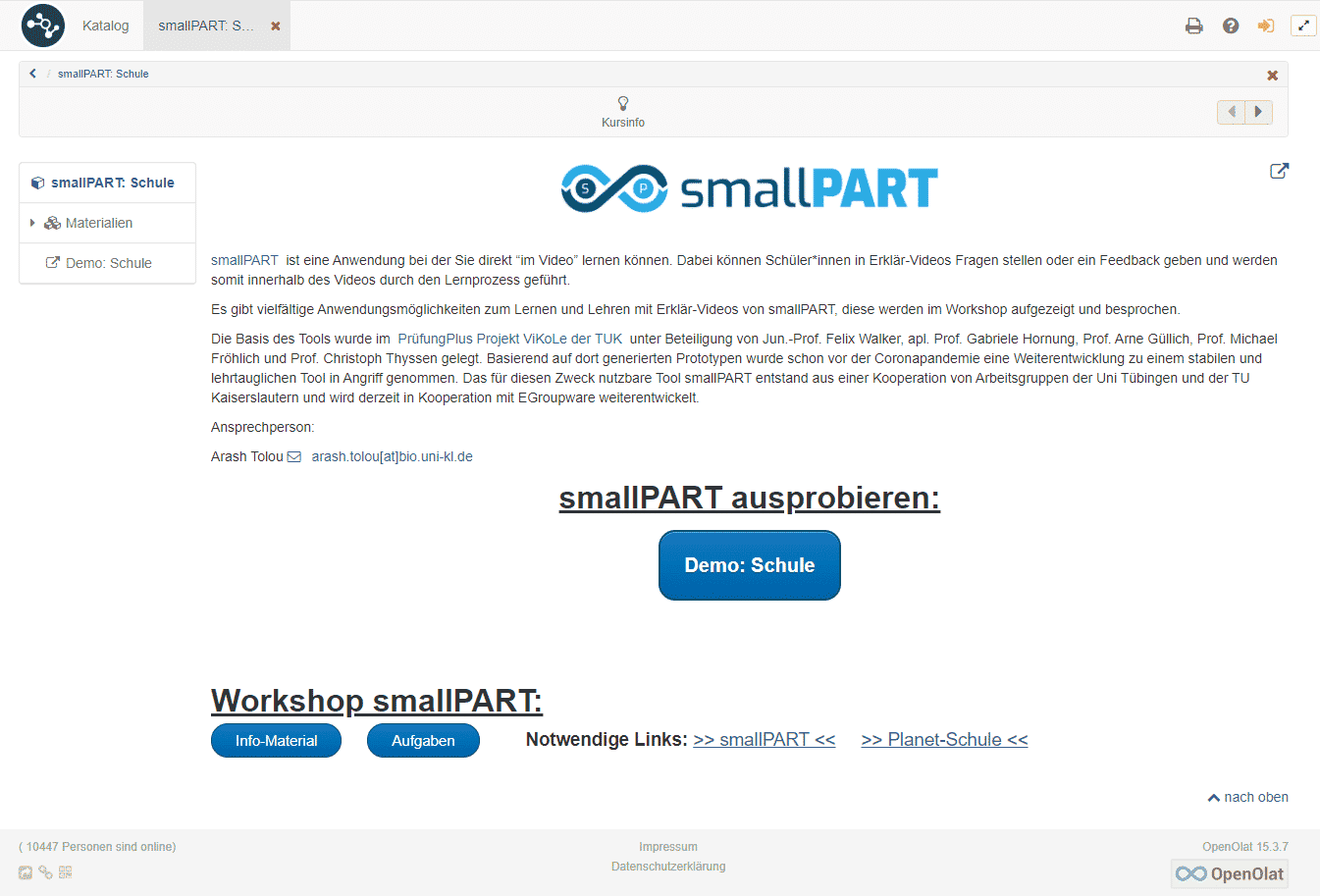
smallPART pour l’apprentissage par vidéo reçoit une extension pour les tests et examens automatisés avec EGroupware 21.1.

Vous créez des questions à choix multiples, vous notez les bonnes réponses et vous fixez des options pour l’examen si nécessaire.
Par exemple, l’élève doit répondre à une question obligatoire avant de pouvoir continuer à regarder la vidéo ou les réponses doivent être affichées dans un ordre aléatoire.

Une fois que le candidat a terminé le test, l’analyse se fait automatiquement. En cas de questions ouvertes, l’enseignant peut simplement les commenter et attribuer des points.

[dt_default_button link=”url:%2Fen%2Fvideo-supported-learning|title:Video%20Supported%20Learning”]En savoir plus sur smallPART … [/dt_default_button]

Partager l’amélioration

dans le Filemanager pour le partage au sein d’EGroupware

EGroupware 21.1 affiche simplement les fichiers ou dossiers partagés dans votre répertoire personnel sous la rubrique “Partages”.
Si vous souhaitez voir ce lien de partage même après vous être reconnecté, ajoutez-le de façon permanente à vos parts en un seul clic. Si vous n’en avez plus besoin, il suffit de le supprimer à nouveau.

[dt_default_button link=”url:%2Fen%2Fdocuments|title:Documents”]En savoir plus sur le partage de documents …[/dt_default_button]

Thème du mode sombre

avec une simple commutation

Préférez-vous un affichage inverse du contenu dans l’obscurité – appelé “mode sombre” ?

À partir de la version 21.1, vous pouvez passer du mode jour au mode nuit d’un simple clic ou automatiquement si votre système d’exploitation le prend en charge, par exemple MacOS.

Téléfonie-Intégration

étendu avec l’identification de l’appelant et l’ouverture de la vue du CRM
Intégration avec le système téléphonique de Placetel

Dans EGroupware 21.1, les appels entrants peuvent désormais ouvrir directement la vue CRM du contact ou de l’organisation.

La condition est soit l’utilisation d’un système téléphonique Placetel dans le cadre des fonctions de la LPE, soit que votre système téléphonique utilise nos appels Api. Vous trouverez des informations plus détaillées sur l’Api dans l’administration des fonctions de la LPE. D’autres intégrations sont par exemple l’affichage des appels dans le calendrier, ou la liste des appels avec les contacts identifiés ou la liste totale des appels (entrants, sortants, manqués) pour l’administrateur. D’autres à venir !

[dt_default_button link=”url:%2Fen%2Fcrm|title:CRM”]En savoir plus sur l’intégration CRM …[/dt_default_button]

Politique de pare-feu d’EGroupware

pour des règlements d’accès plus complexes Externe/interne

EPL uniquement

Vous voulez définir une règle précise pour vos organisations, comme “qui est autorisé à se connecter, quand et comment” ?

L’accès au réseau de l’entreprise est censé être utilisé comme un second facteur (2FA) ? Il vous suffit de spécifier les plages de PI correspondantes. Vous souhaitez autoriser l’accès pour une durée limitée ou ne permettre l’accès depuis l’extérieur du réseau de l’entreprise via 2FA et uniquement pour les groupes administration, vente et gestion ?

Tout cela est possible grâce à la politique de pare-feu.

Smart Working – Educazione e scuole

Smart Working – Educazione e scuole

Ufficio a domicilio per le scuole

You are currently viewing a placeholder content from YouTube. To access the actual content, click the button below. Please note that doing so will share data with third-party providers.

More Information

Un lavoro più intelligente nell’home office per le scuole e l’educazione

Questo webinar mostra le nuove funzionalità di EGroupware e l’invio e la presentazione di videochiamate e l’integrazione di Guacamole.

Relatore: Birgit Becker – amministratore delegato, supporto e consulenza:

  • Calendario delle riunioni tramite videoconferenza: seleziona la videoconferenza come luogo e invia il link alla conferenza direttamente tramite invito
  • Openid – aprire applicazioni esterne con diritti di accesso in EGroupware: integrare applicazioni esterne in un iframe in EGroupware, ad esempio sito web, altri wiki, portainer (set di strumenti di gestione docker) o archiviazione e-mail
  • Postazione di lavoro a casa tramite Guacamole-Apache: Condividi il desktop aziendale e visualizzalo in EGroupware – Interessante per tutti coloro che non hanno un portatile

Il webinar è disponibile solo in lingua tedesca. Se hai bisogno di aiuto con questi strumenti, contattaci.

[dt_default_button link=”url:https%3A%2F%2Fwww.egroupware.org%2Fen%2Ftutorials|title:Webinars%20%E2%80%93%20Tutorials” size=”custom” border_radius=”3px”]Altri webinar[/dt_default_button]
Nouvelles fonctionnalités et applications dans EGroupware 21.1

New features and applications in EGroupware 21.1

New features and applications in EGroupware 21.1

Dear EGroupware user,

As you probably noticed, EGroupware has (since the beginning 2021) a new website and a new logo, which we here introduce for the first time. Have a look at our EGroupware Website there is a lot to discover. Furthermore, the development of EGroupware 21.1 is on track and a first pre-release version will be soon available. EGroupware 21.1 is already available in the EGroupware Cloud – for example used in our supportcenter.
If you are interested in testing EGroupware 21.1, just let us know.


Key features of EGroupware 21.1


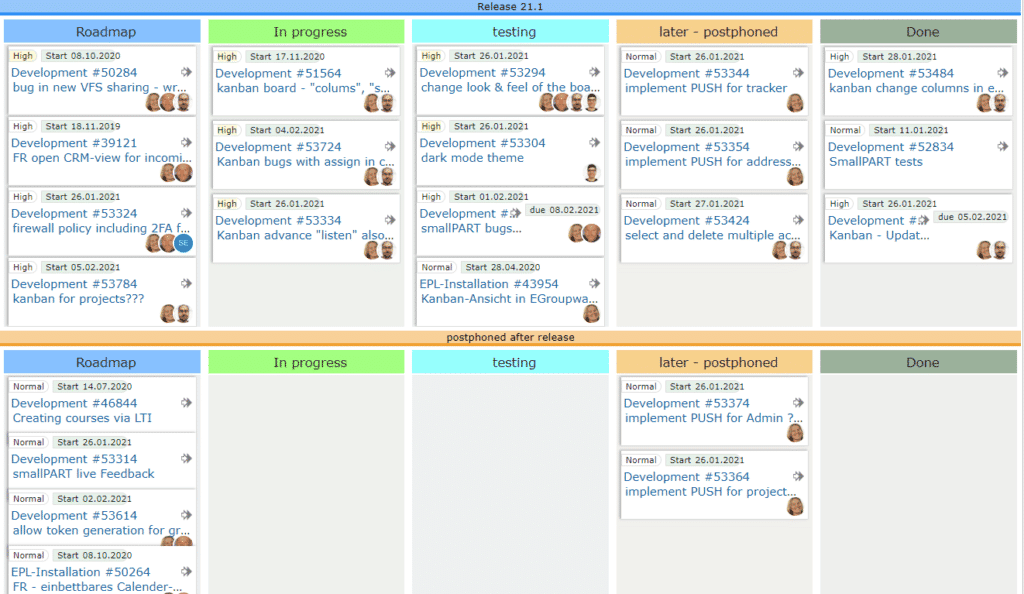
  • Kanban Board board for tasks, projects, tickets or as sales-funnel for the sales department
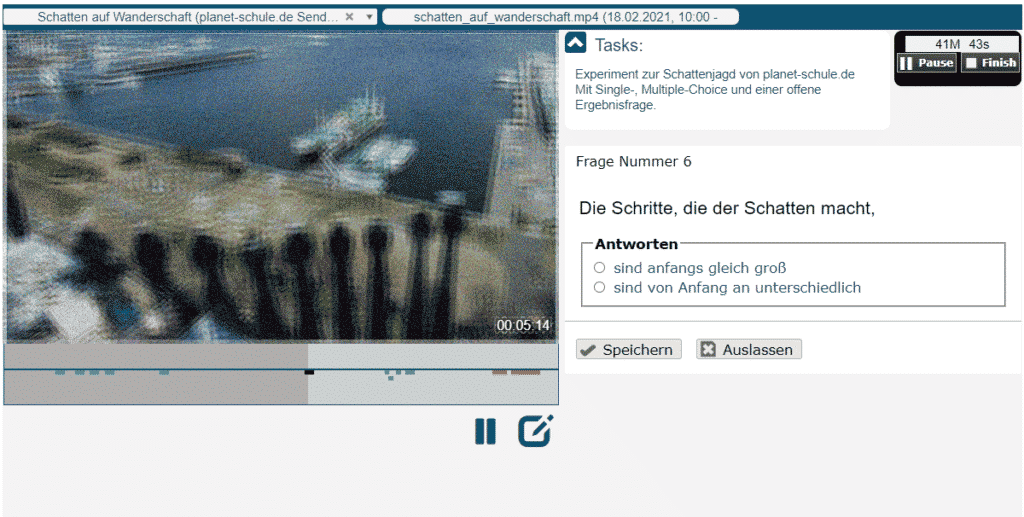
  • smallPART video-based learning with Single/MultipleChoice or open questions for tests and exams
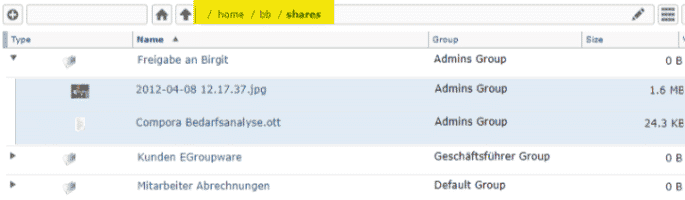
  • Sharing Enhancement in the Filemanager for sharing within EGroupware
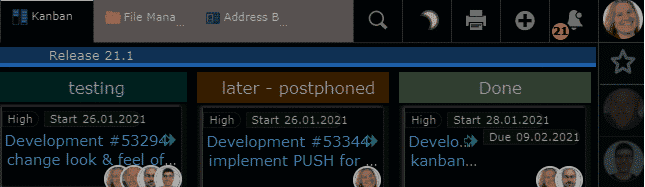
  • Dark Mode Theme with easy switching
  • Telephony Integration enhanced with caller ID and opening of CRM view
  • EGroupware Firewall Policy for more complex access regulations External/Internal


EGroupware Homeoffice Integration


With EGroupware you can work in your home office or at distributed locations. Access tasks, appointments, files, addresses and projects together.

  • Work together on your documents with Collabora Online,  which are stored centrally in the EGroupware filemanager.
  • Chat and video conferences  via Jitsi or BigBlueButton are also possible in compliance with GDPR. If you do not want to operate your own video server, we recommend the following German providers: KiwiTalk.de and bbbserver.de
  • With the Guacamole module, you get a fully-fledged home office workplace through secure web browser access to your PC in the company.


EGroupware Mailserver Packages and SpamTitan


EGroupware mail server packages (dovecot based with PUSH): (dovecot basierend mit PUSH):
Recommended for self-installation with users in SQL
Advantage: easy administration of mail accounts from EGroupware including alias, forwarding, permission of email accounts or folders for other users, Sieve filter rules and absence notice (can also be set by an admin for others e.g. in case of illness).
Optional spam and virus filtering via SpamTitan including API connection in EGroupware for marking SPAM/Ham (learning mode) or blacklists/whitelists.

Kanban application

for tasks, projects, tickets or as a sales funnel

EPL only

With the new Kanban application, you manage processes smart and flexible.
You simply define a Kanban board with the applications and user groups you want to use.
For more automatism, you define how new entries are added or actions that should take place when they are moved.

For example, if you move a task to the “done” column, it is closed and removed from the board. Two people are responsible for a process step? You define this on the board and the assignment happens automatically.

[dt_default_button link=”url:%2Fen%2Fkanban|title:Kanban”]More about Kanban …[/dt_default_button]

smallPART for tests and exams with single, multiple choice or open questions


Embedding via LTI in learning platforms

smallPART for video-based learning receives an extension for automated tests and exams with EGroupware 21.1.

You create multiple choice questions, mark the correct answers and set options for the exam if necessary.
A compulsory question for example, has to be answered before the student can continue to watch the video or the answers should be displayed in a random order.

Once the test taker has completed the test, the analysis happens automatically. In case of open questions, the teacher can simply comment them and award points.

[dt_default_button link=”url:%2Fen%2Fvideo-based-learning|title:Video%20based%20learning”]More about smallPART … [/dt_default_button]

Sharing enhancement

in the Filemanager for sharing within EGroupware

EGroupware 21.1 simply displays shared files or folders in your personal home directory under “Shares”.
If you want to see this sharing link even after logging in again, add it permanently to your shares with one click. If you no longer need it, simply delete it again.

[dt_default_button link=”url:%2Fen%2Fdocuments|title:Documents”]More about document sharing …[/dt_default_button]

Dark Mode Theme

with simple switching

Do you prefer an inverse display of the content in the dark – called Dark Mode?

As of version 21.1, you can switch between day and night mode with a single click or automatically if your operating system supports it, e.g. MacOS.

Telefonie-Integration

extended with caller ID and opening the CRM view
Integration with Placetel telephone system

In EGroupware 21.1, incoming calls can now directly open the CRM view of the contact or organisation. 

The requirement is either the use of a Placetel telephone system as part of the EPL functions or that your telephone system uses our Api calls. More detailed information about the Api can be found in the administration of the EPL functions. Further integrations are for example the display of calls in the calendar, or the call list with identified contacts or the total call list (incoming, outgoing, missed) for the administrator. More to come!

[dt_default_button link=”url:%2Fen%2Fcrm|title:CRM”]More about CRM Integration …[/dt_default_button]

EGroupware Firewall Policy

for more complex access regulations External/Internal

EPL only

You want to define a fine-grained rule for your organisations, like “who is allowed to log in when and how”?  

Access to the company network is supposed to be used as a second factor (2FA)? You simply specify the corresponding IP ranges. You want to allow access for a limited time or only permit access from outside the company network via 2FA and only for the groups admin, sales and management?

All this is possible with the firewall policy.

smallPART Tutorial LTI Connection

smallPART Tutorial LTI Connection

smallPART Tutorial LTI Connection to the Learning Management System OpenOlat

You are currently viewing a placeholder content from YouTube. To access the actual content, click the button below. Please note that doing so will share data with third-party providers.

More Information

smallPART Tutorial LTI Connection to the Learning Management System OpenOlat of the TU Kaiserslautern

Learn in this short video how to connect the EGroupware application smallPART to the learning management system OpenOlat of the TU Kaiserslautern. So participants themselves only act in the familiar learning system. EGroupware simply serves as a platform for the creation and storage of the smallPART data.

If you have any further questions, please do not hesitate to contact the EGroupware Support.

[dt_default_button link=”url:https%3A%2F%2Fwww.egroupware.org%2Fen%2Ftutorials|title:Webinars%20%E2%80%93%20Tutorials” size=”custom” border_radius=”3px”]More Tutorials ansehen[/dt_default_button]
This site is registered on wpml.org as a development site. Switch to a production site key to remove this banner.