
EGroupware 23.1 available as of today
Dear EGroupware users,
Finally the time has come: The latest EGroupware version 23.1 is available. With the release, we would like to provide you with important information about the latest version and share a few useful links.
The most important innovations at a glance:
✔ Technology changeover: Web Components and Lit
✔ Working time recording and timer for projects
✔ Innovations in the Mail app
✔ OAuth authentication for Office365 and Gmail accounts
✔ Optimizations in the file manager
✔ Innovations for administrators
✔ New functionalities
✔ Performance improvement for large installations
We will perform updates of the EGroupware Cloud in the next few weeks with appropriate advance notice.
Information for Self-Installations
By default, the update to EGroupware 23.1 is triggered by the update of the egroupware-docker DEB/RPM package tonight (03/15-16). If you do not install the package update, there will be no automatic update to the new version.
Here you can find all information about the self-installation via the EGroupware GitHub page and the link to the EGroupware ChangeLog.
New: Working Time Recording and Timer for Projects
On September 13, 2022, the german Federal Labor Court (BAG) ruled that employers in Germany are required to introduce a system for recording working hours.
EGroupware customers do not have to set up or buy a new solution for this – the recording of working hours is already integrated in version 23.1.
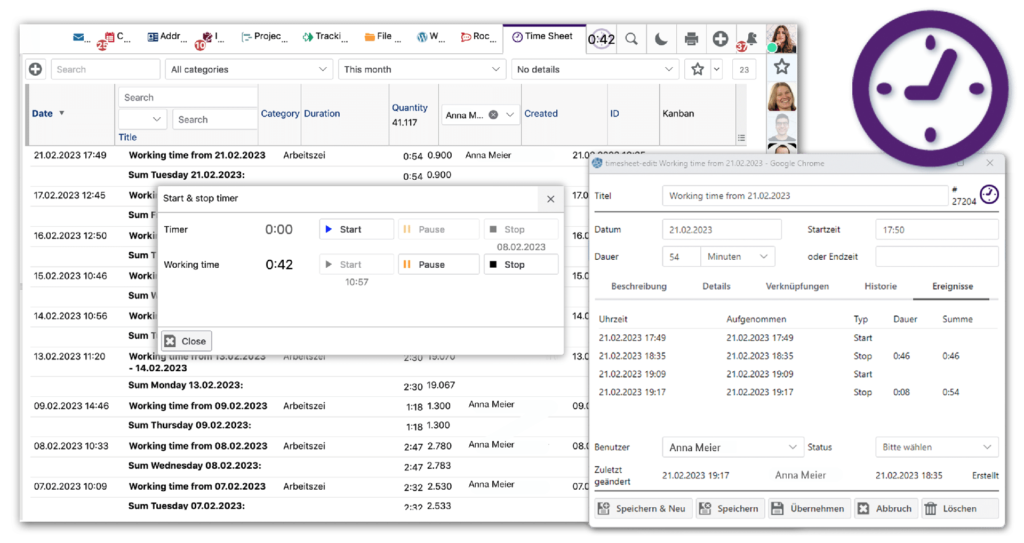
Immediately after logging in, users see a dialog that allows them to start their working time. One click is enough, and the working time recording runs discreetly in the background. When logging off, there is a reminder of the running time recording.
The button for the timekeeper is located at the top right of the menu, right next to the search function. Clicking it opens a dialog for pausing, resuming and stopping the working time. Here you will find another timer for project-related work. Both timers cooperate with the EGroupware timesheet.
The project timer also integrates with other EGroupware modules; users can, for example start it e.g. from the ticket system or the project manager.
New Features in Mail Client and File Manager
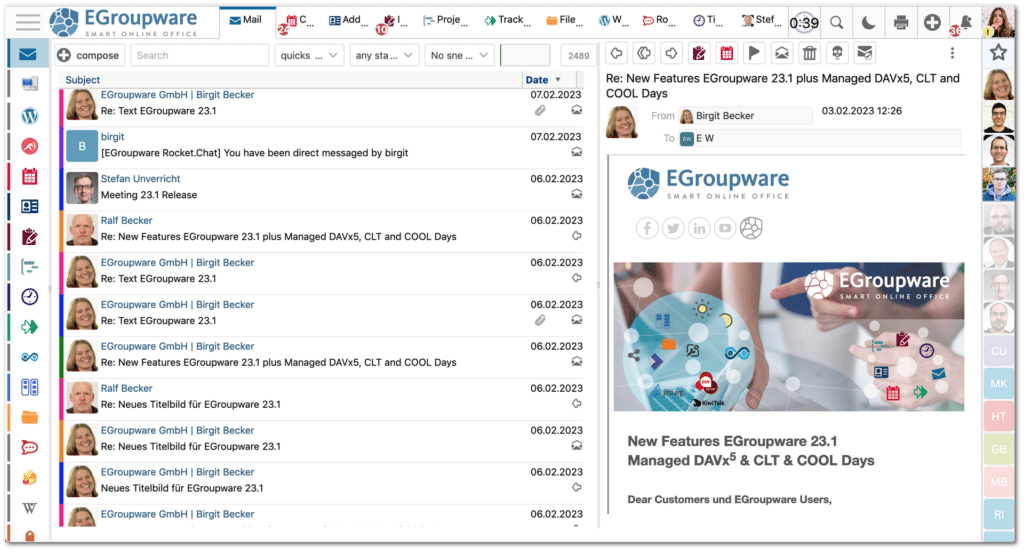
The EGroupware mail client is tidier and clearer in its three-column view. In addition, there is a new mail address widget. It transfers data from e-mails to the address book and opens the CRM view by clicking on the avatar. Also new in the mail app: users can open, read and edit attached Office documents directly in Collabora Online in the browser.
EGroupware 23.1 allows EPL version customers to set quotas in the file manager and thus limit the storage space for individual users or groups. This is especially beneficial for admins of large environments who want to manage storage use in personal directories. In addition, the file manager now displays recently uploaded files via push notifications.
Web Components and Lit

Ralf Becker, Head of EGroupware Technology & Development: “These future-proof technologies ensure that our software will still be up-to-date in five years’ time”.
The changes in the background, which are invisible to users, enable greater user-friendliness. The layout of the dialogs has improved and clearer structures make it easier to work with the software solution. The font size can be adjusted, which is an important step in terms of accessibility. With this option, we are also launching support for screen readers, which is planned for the next release.
Our developers have also cleaned up the icons and widgets and provided a better overview. As of 23.1, many new icons in SVG format enable better readability.
Articles about EGroupware 23.1
EGroupware 23.1 in the german Press
- LINUXNEWS – 03. April 2023
- Deutscher Presseindex DP – March 15, 2023
- ECMguide.de – Documents in Business – March 06, 2023
- Pressebox – March 02, 2023
- Software Journal – March 02, 2023
- Presse Control – March 02, 2023
- Presse-Blog – March 02, 2023
- Presse-OpenPR – March 15, 2023
If you have any questions regarding EGroupware 23.1, please feel free to contact us at any time.
Best regards
Your EGroupware Team