E-Invoicing Made Easy with EGroupware
E-Invoicing Made Easy with EGroupware
Big changes are coming on January 1, 2025. Thanks to the German Growth Opportunities Act, electronic invoicing (or e-invoicing) will become mandatory for B2B transactions in Germany. What does this mean for you? No more stacks of paper invoices—just streamlined digital workflows.
E-invoicing makes life so much easier. Instead of dealing with paper invoices or static PDFs, your invoice data goes straight into your system in a structured, machine-readable format. No more manual processing, no more errors—just a smooth, digital workflow from start to finish.
That’s why we built the perfect tool to help you out: the E-Invoicing App for our Groupware solution. With this app, you can easily create and receive electronic invoices that fully comply with EU standard EN 16931. Whether it’s XRechnung (XML format) or ZUGFeRD (a hybrid PDF/XML format), your data is automatically generated in the right format, and you can customize the PDF layout to match your style.
Germany’s 2025 E-Invoicing Rules: What Your Business Needs to Know
E-invoices need to be created, transmitted, and read in a structured electronic format to allow for seamless digital processing. Important: a simple PDF file doesn’t cut it—it’s not considered a legally compliant e-invoice!
Starting in 2025, the new rules kick in. All domestic businesses handling B2B transactions in Germany will be required to receive and process e-invoices. But don’t worry, there are some transitional arrangements in place:
- In 2025 and 2026, paper invoices and other electronic formats will still be allowed—but only with the recipient’s consent.
- From 2027, this exception applies only to businesses with an annual revenue of €800,000 or less (based on 2026 figures).
- EDI invoices (electronic invoices exchanged via an Electronic Data Interchange system) will also remain permissible until 2027, as long as the recipient agrees.
Your Perfect Match: EGroupware’s New E-Invoicing App
Do you already have accounting software? Or are you thinking about getting one? Recently, many EGroupware users have asked us if they really need yet another tool—possibly one tied to a pricey subscription model. Why complicate things? The E-Invoicing App is here to simplify your workflow. It’s designed to fit seamlessly into your EGroupware environment and make the transition to e-invoicing as smooth as possible.
We started development in late November after discovering a PHP library capable of generating XML for electronic invoices. Less than three weeks later, on December 14, the app was ready. The corresponding packages for EGroupware version 23.1 have already been built, and the app is available both as a preview for on-premises installations and in the latest cloud versions.
One thing to keep in mind: The app is exclusively available as part of our Enterprise Line (EPL). While it’s not included in the Community Edition (CE), EPL users get access to this powerful tool along with a host of other premium features.
Creating Invoices Made Simple: A Quick Tour of the App
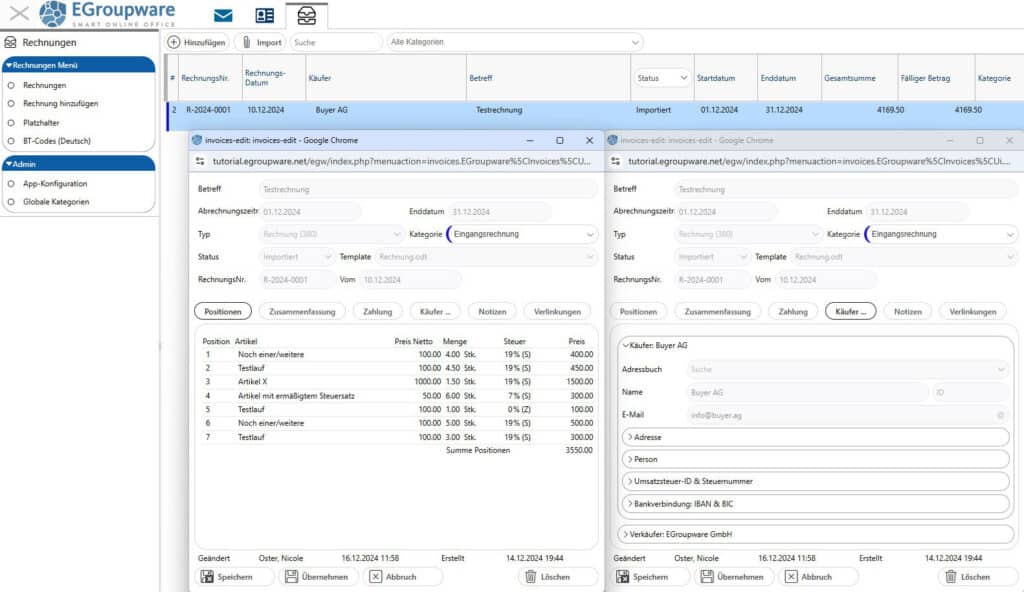
You’ll find the new E-Invoicing App in the left-hand sidebar under Invoices. A single click opens the main window, where all your sent and imported invoices are displayed in an organized table. You can sort the table by column headers—like Invoice No./Date, Buyer, Seller, or Subject—to quickly find what you need.
To create a new invoice, click Add. Alternatively, you can upload and review e-invoices (structured XML or PDF with XML attachment) using the Import button. When setting up a new invoice, enter details like the subject, billing period, and invoice type in the top half of the dialog window. Currently, only Commercial invoice 380 is available, but other types like Credit Note (381) and Corrected Invoice (384) are coming in January. You can also assign a category—either custom or from a predefined list—along with the invoice number and date.
As long as the invoice is in draft status, you can adjust all the details as needed. This gives you the flexibility to ensure everything is accurate. However, once you click the Issue button, the invoice is finalized. A confirmation prompt appears before saving, and after that, most fields become read-only and can’t be changed.
A handy feature is the Notes area, where you can add comments—like the date of a payment reminder or overdue notice. Here’s a pro tip: Hover over a field label to see a tooltip showing the corresponding XML field number. For example, the invoice number is BT-1, the billing period is BT-73, and the invoice type is BT-3. Pretty useful, right?
Line Items, Buyers, and More: Completing Your Invoice
The lower half of the dialog is where you fine-tune your invoice using several tabs:
- Positions: Add products or services here. Each line item includes standard fields like position, article, description, quantity, price, and VAT. Items are automatically saved to the database for future reuse. Position numbers are assigned automatically but can be adjusted manually if needed.
- Summation: This tab provides an overview of VAT, discounts, rounding amounts, and surcharges. Advance payments can also be factored in, and all totals are calculated automatically.
- Payment: Enter references, project numbers, contract details, and payment terms like discounts or due dates.
- Buyer: Select buyer information directly from the EGroupware address book or manually add additional contacts. You can also fill in optional fields like VAT IDs and tax number if required.
- Notes: Add remarks that can either be part of the invoice or for internal use only.
- Links: Attach files, select documents from the file manager, or link to entries in other EGroupware apps like InfoLog or the Project Manager.
Flexible and Personalized: Configuring the App
Head over to Admin / App configuration in the left-hand sidebar to tailor the E-Invoicing App to your business needs. On the General tab, you can set up the format for invoice numbers. By default, invoice numbers are automatically assigned in sequence when you set the status to Issued. Prefer a custom format, like project-based numbering? No problem—you can configure it here. If you’re switching to the app mid-year, simply input the last invoice number you used, and the numbering will continue seamlessly. Alternatively, you can skip setting a format and assign invoice numbers manually.
You can also define up to three standard sellers, including their address, bank details, and tax information. Specify which additional business partners you need, like buyers, end customers, or alternate invoice recipients. Partner information can be selected from the address book, and custom fields—for instance, customer numbers or VAT IDs—can be assigned as needed.
For even greater control, you decide whether your accounting team can only choose predefined sellers, search the address book, or edit contact details. With customizable fields and settings, the app adapts perfectly to your workflows.
Design Your Own Invoices: Templates and Placeholders
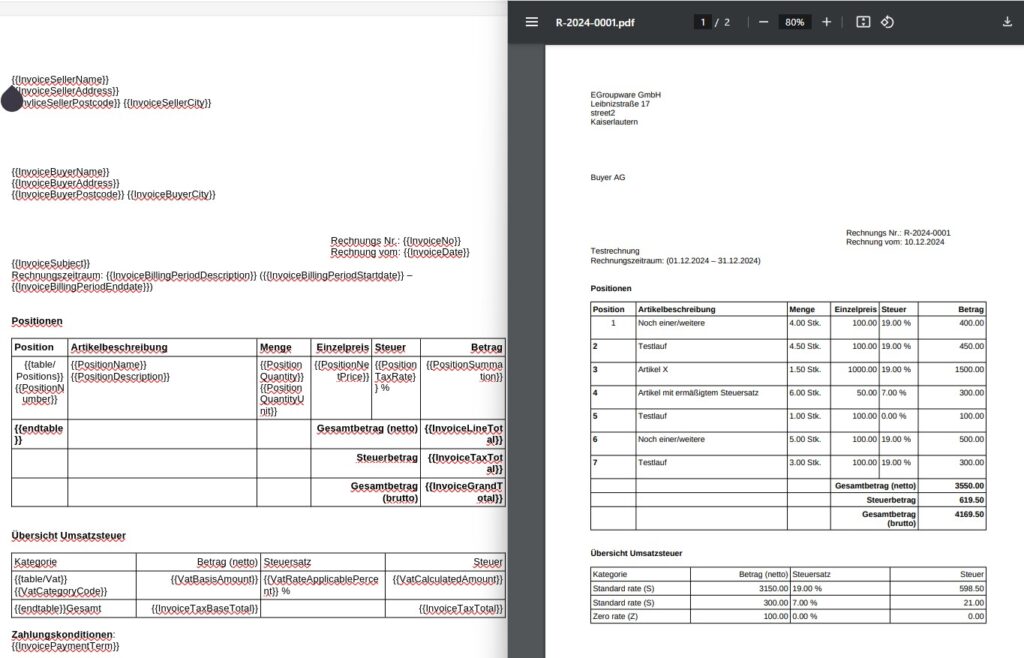
The PDF part of your invoice is fully customizable—you can design it exactly how you like, even using the integrated Collabora Online app. Add your logo, arrange data to suit your needs, and define the layout, including the table for invoice line items. Meanwhile, the XML portion is automatically generated in a standardized format and seamlessly integrated into the PDF as part of the ZUGFeRD format.
We’ve included a ready-to-use template that you can adjust to match your style. All templates are stored in the /templates/invoices folder in .odt format. If you’ve saved multiple templates there, you can easily select one from a drop-down menu while creating an invoice.
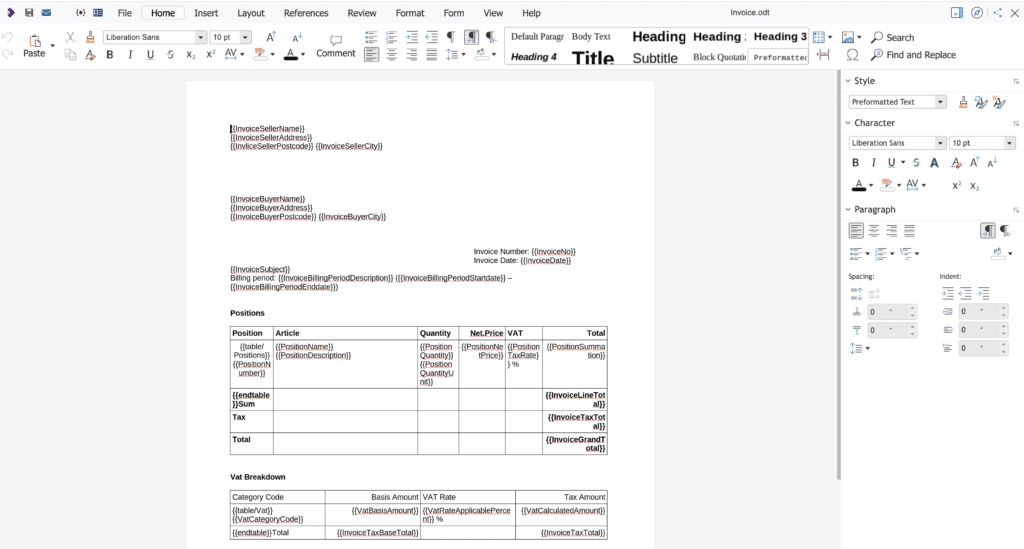
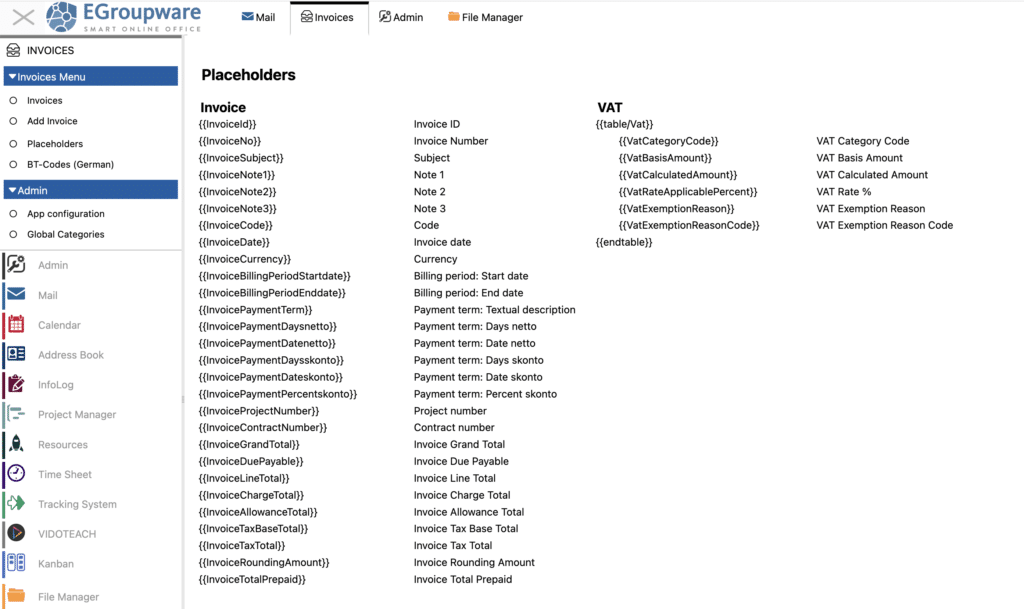
A great feature is the placeholders, which you can easily incorporate into your templates. Placeholders are text variables enclosed in double curly braces, like {{InvoiceId}} or {{InvoiceNo}}. Most placeholders pull data directly from the database, but you can also use functions like If-Then-Else conditions. These allow you to handle things like removing empty spaces or adding line breaks when specific fields are filled.
You’ll find a complete list of available placeholders under Invoices / Placeholders.
What’s Next? Upcoming Features for the E-Invoicing App
Right now, you still need to download e-invoices and manually attach them to an email. But that’s about to change! We’re working on enabling email sending directly from the E-Invoicing App. This will include customizable email templates for tasks like sending invoices or payment reminders—even in multiple languages. With placeholders, you’ll be able to personalize these emails, adding invoice numbers, order details, or contact names right in the subject line or email body.
We’re continuously developing the E-Invoicing App, and there are plenty of practical features on our to-do list for the coming months:
- Import and display invoices directly from the Email App.
- Quickly copy existing invoices for recurring tasks.
- Additional import options, like CSV files.
- Advanced reports and export functions for deeper analysis.
- Seamless integration with other EGroupware apps, like Time Sheets, to directly transfer recorded data into invoices.
Got more ideas or specific requirements? Let us know! Whether it’s integrations with accounting tools or banking systems, or other customizations, we’re here to help. We’re committed to continually improving the app to fit perfectly into your daily workflow.
A Smart Solution for the Smart Online Office
The E-Invoicing App from EGroupware offers a practical, flexible solution that meets legal requirements while helping to digitize your business processes. With customizable layouts and support for multiple formats, the app is a valuable tool for businesses of all sizes—from small companies to large organizations.
Got questions or want to try the app for yourself? Reach out to us! We’d be happy to provide a test version, walk you through the features, or hear your suggestions. Drop us a message—we look forward to connecting with you!